Change VPS Password

This guide talks you through changing the default Administrator password through your client panel.

To change a password for another account – press Win+R and type netplwiz and press open, select the user account -> click Reset Password -> Enter the new password and click confirm.

I do have access to my VPS #

Navigate to Settings -> Accounts -> Sign In Options -> Password -> Change

I don’t have access to my VPS #

Step 1 #

Please head to your Client Portal -> Services -> My Services -> Select your VPS -> Scroll down until you see the VPS Panel

Step 2 #

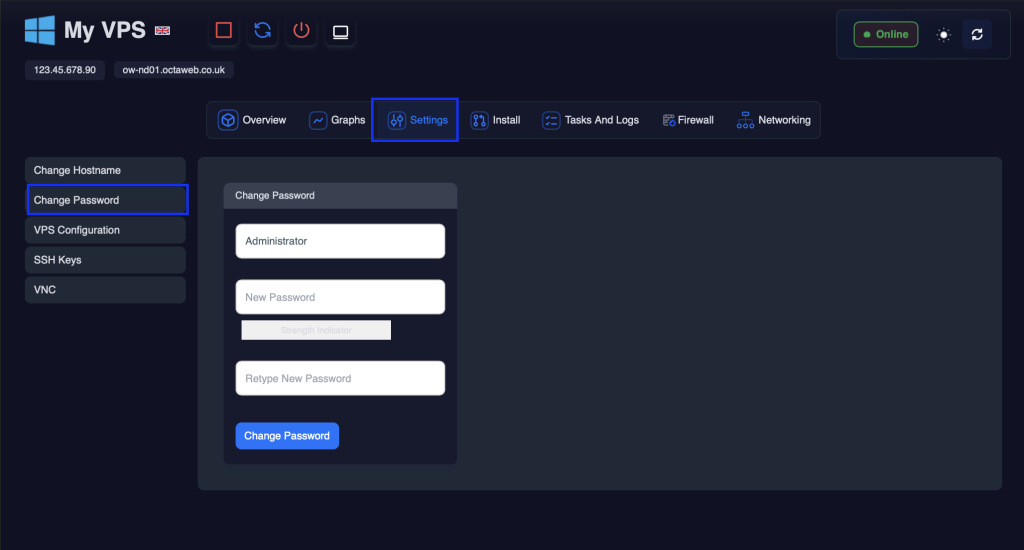
Click on “Settings” followed by “Change Password”
Step 3 #

Input your new password and click “Save Changes”

Step 4 #

You will then see the following message 👇

We must now turn off the VPS and power it back on to affect the password change.

Step 5 #

First click the power off icon

Please then wait for 30 seconds.

Step 6 #

Now press the start button

Important:

Still need support?

Our team is happy to help. Click the button below to get in touch.

This guide talks you through changing the default Administrator password through your client panel.

To change a password for another account – press Win+R and type netplwiz and press open, select the user account -> click Reset Password -> Enter the new password and click confirm.

I do have access to my VPS #

Navigate to Settings -> Accounts -> Sign In Options -> Password -> Change

I don’t have access to my VPS #

Step 1 #

Please head to your Client Portal -> Services -> My Services -> Select your VPS -> Scroll down until you see the VPS Panel

Step 2 #

Click on “Settings” followed by “Change Password”

Step 3 #

Input your new password and click “Save Changes”

Step 4 #

You will then see the following message 👇

We must now turn off the VPS and power it back on to affect the password change.

Step 5 #

First click the power off icon

Please then wait for 30 seconds.

Step 6 #

Now press the start button

Important:

Still need support?

Our team is happy to help. Click the button below to get in touch.